- Published 01.19.2026
- type Thematic news items
- Training 3D Animation & FX
Summarize with:
What is animatics?
Used by the entire animated film industry, whether 2D or 3D, animatics is an essential creative tool. But what does it mean?
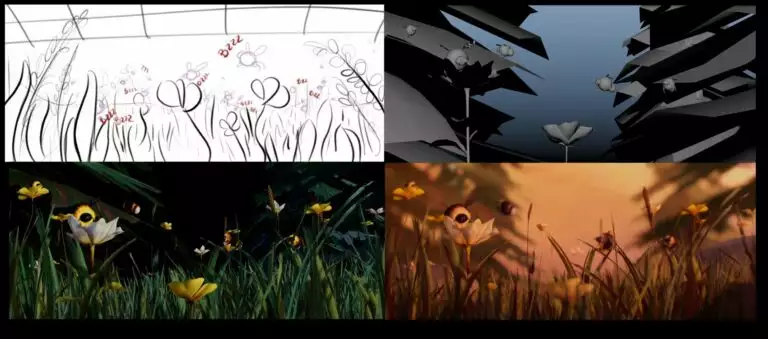
This element of the production chain can be defined as an “animated storyboard”. A working tool resulting from the writing and development of the animation project, it is a skeleton on which the entire film will be built, giving a good overview of the final project. This is sometimes accompanied by a sound track, dialogue and music, which gives the teams an overview of the project. Animatics are also used to preview the editing process, allowing adjustments to be made to the rhythm before moving on to the production stage.
The difference between animatics and storyboarding
While animatics are often based on images from the storyboard, storyboards are distinguished by their movement and rhythm. It is generally the next stage after the storyboard, and translates the descriptions, framing and movements evoked in the storyboard into simple animations.
Finally, in terms of format, the animation is presented in video format, whereas the storyboard is a series of still images, with no sound effects or voices accompanying the project.

The stages in creating an animatic
As the skeleton of the future animation project, it is essential to be able to plan and budget for the creation of an animatic very early on in the development of the project. In France, a number of grants, such as the CNC’s “Aide à l’écriture” and “Aide à la préparation”, provide partial funding for this development, which is very costly in terms of time and energy, but nonetheless crucial in unlocking the funding needed to complete the project.
It is not uncommon for producers to decide to finance part of this themselves, to make it easier to convince potential financiers.
This was the case withArco, an animated feature film recently awarded the Cristal at Annecy, where director Ugo Bienvenu and his producer Félix de Givry produced 45 minutes of animated footage on their own before signing on with Natalie Portman and her production company MountainA.
But how do you create an animatic?
Before the digital age, this tool was created on the studios’ title desks, but today it’s much easier to create quality animatics thanks to modern digital animation tools. From an organisational point of view, here’s how we recommend you create your animatic:
From the image to the editing table
The first stage in building your animatic consists of gathering your storyboard visuals and integrating them into an editing tool. There, you can define the length of the shots, and place your visuals in the order of the narrative to create a fluid story.
Defining rhythm and camera movements
With animatics, you can give your storyboard an extra dimension by integrating zooms, pans and camera movements into your project. An excellent visualisation tool, it is also a skeleton that allows the animation teams to calculate the length of shots, and the director to visualise his or her editing.
As animation is an expensive art, it is important that this first ‘version’ of the film reflects the final cut of the project as closely as possible, to avoid any loss of animation or sequences that will ultimately be unused.
Casting, sound effects and music
It is often at the animatic stage that the voices (temporary or permanent) are integrated, along with the sound effects and the beginnings of what will be the project’s soundtrack. Once again, for the sake of efficiency and to avoid wasting energy and budget. In the context of high-level projects where the characters’ mouths have to be synchronised with the dialogue (lip syncing), recording these voices upstream also allows the animation teams to work directly on the final material, avoiding iterations.

Tools and software for creating an animated film
To build your animatic, it’s essential to arm yourself with the right tools. Software such as Adobe Photoshop or Toon Boom Harmony allow you to create 2D animatics intuitively in just a few key steps, which we describe in detail above. Each of these programs has an editing workbench and sound integration tools that enable you to create an animatic from A to Z, even if they can be difficult to get to grips with.
In addition to this paid-for software, Blender (free and open source) can also be used to create animatics, and its very active community offers numerous tutorials. Finally, online tools such as Animaker or even Canva can be used to create simple animations of this type. It all depends on the scale of your project and the teams you will be working with. If your ambition is to build a career in animation, a course at a 3D animation school is the best way to learn about animation creation tools, because you’ll be creating your own.
In which sectors do you need animatics?
While animated film is obviously the first sector that springs to mind when we talk about animatics, video games regularly use this tool for their narrative sequences. In live-action cinema, filmmakers such as Wes Anderson often use animatics to set up their key sequences, as do musicians who are fond of animation for their music videos.
Finally, the advertising and marketing sector often uses this working tool before moving on to the production phase of impactful campaigns. All these applications offer a wealth of opportunities for specialists in this field.
Discover all the news
-
 Video Game
ESMA GAME SHOW: a 100% video games day in Montpellier
01.14.2026 -
When research and creation contribute to educational innovation: a partnership between Lumière Lyon 2 University and ESMA
01.12.2026 -
 3D Animation & FX
When an ESMA dragon enters a museum: Achoo joins the DRAGONS exhibition at Quai Branly
01.08.2026 -
 3D Animation & FX
ESMA film TRASH shortlisted for prestigious Annie Awards
01.07.2026 -
 3D Animation & FX
Update on the 3D animated film selections for December 2025
01.05.2026 -
 3D Animation & FX
ESMA alumni dominate Pixar's RenderMan Art Challenge 2025
12.22.2025